
ChrisDucker.com

Helping Entrepreneurs Go The Distance In Business… And Life!

  • About
  • Mastermind
  • Speaking
  • Books
  • Blog
  • Resources
  • Youpreneur
  • About
  • Speaking
  • Coaching
  • Conference
  • Books
  • Blog
  • Tools
  • Contact

10 Quick Steps to Becoming a Virtual Entrepreneur!

To become successful as a virtual entrepreneur takes more than just building a few niche sites and relying on Adsense (although we do enjoy it, don’t we VBL Niche Site Project peeps!?). I’ve taken a huge journey over the last couple of years, becoming more and more virtual as time has passed. And I’ve loved every minute of it.

So, today I thought it would be a good idea to create a small selection of tips and tactics for everyone to follow, if they are not ‘quite there’ in regards to ‘going virtual’. And even if you are already classing yourself as a virtual entrepreneur, I’m pretty sure that there are a gems below that you can still put into place.

Enjoy.

#1 – Quit Your Job!

If you’re working a regular job and you’re on this blog, the chances are that you hate what you’re doing! Stop doing that!!! In this day and age everyone has something to offer the world. Cash in on your passion and start changing the world! Obviously, moving on from ‘cubicle nation’ might be easier for some than others. However, if you find yourself counting the hours and minutes to 5pm each day, the chances are it’ll happen sooner or later. Do it now, stick it to the man, and start something awesome!

#2 – Remove Yourself from ‘Biz Operations’ as Much as Possible

This one is more for those of you who might be running a ‘brick n mortar’ business already. Last year I did everything I could to go as virtual as possible. I achieved it. And the icing on the cake came this year, when I hired a COO to come in and run the show for me on a day-to-day basis. He does a great job, we connect several times a week via phone and face-to-face once a week for a proper catch-up. Having other people looking over your company might seem a little daunting at first, but the bottom line is that if you want to ‘go virtual’, its the only way you’e truly going to achieve that freedom.

#3 – Purchase a Light-Weight, Portable Laptop

Being virtual means being mobile! I used to carry around a huge Acer laptop. I liked it as I wasn’t traveling that much and used it as a ‘main’ computer. But the weight and size of it made being mobile a massive chore. I upgraded to a MacBook Pro a couple of years ago and felt liberated. However, this year I craved for even more lightweight freedom and purchased the 11″ MacBook Air – enough said. Combine that with my iPad and I am about as virtual as I wanna be!

#4 – Purchase a ‘Skype-In’ Number

This thing literally changed my life, when it comes to communication. Getting your hands on a Skype-In online number basically means that anyone can call that number (pick one from a massive list of countries to best suit your needs) and it will ring on your Skype account no matter where you are in the world. If you’re not signed into Skype at the time the call comes through, it’ll just go to your voicemail. It’s been truly invaluable to my virtual-ness.

#5 – Get Smart With Your Phone

I recently read a report somewhere online that said only 35% of people that own smart phones (Blackberry, iPhone, etc.) actually use them to make phone calls. Mind-boggling, isn’t it! But, if you think about it a little more – not so much. I’ve had my iPhone4 for well over a year now, and I love it. Before that I was a Blackberry user for years and years. Being able to check email, etc., on the run is essential to doing business virtually. Not only that, but the App’s available nowadays make owning a smartphone as a business owner an absolute necessity! They make everything easier, lets face it! And, there are some cool games, too.

#6 – Get Going with Dropbox

This one little piece of software has revolutionized the way I share files and work with my various virtual assistants and even my team in my company facility. It’s quick, reliable, has lots of storage space available, and is a breeze to use. Not only that, but Dropbox is one of those cool software app’s that allows you to sync it across multiple devices. I have my account hooked up to my iPhone4, iPad, MacBook Air and my iMac at home. Wicked! Get Dropbox now, seriously!

#7 – Take Your Inbox & Calendar to the Cloud

Whether you use Google’s suit of app’s, such as Gmail and GCal, or Apple’s ‘MobileMe’, or a combo of the two, like I do – taking your email and calendar (along with your contacts should you so desire) is probably one of the biggest jumps to make in going virtual, but also one of the most important. Not having your email and calendar handcuffed to just one computer is paramount in turning yourself into an all-living, all-breathing virtual entrepreneur!

#8 – Start Creating Passive Income Streams

This is as important as anything else on this list… Working hard to create passive income streams NOW, will benefit you (if you’ve done it properly) over and over again, with very little involvement in the future. Everything from niche sites and eBook’s, to membership sites and coaching programs. Like I said, we’ve all got something to offer the world. Just be sure that you create your passive income products with long-term in mind and avoid looking for a quick buck. It just doesn’t work that way anymore!

#9 – Hire a Virtual Assistant

Okay, so I’m a little biased when it comes to this one – for obvious reasons! However, having someone else (or a team of someone else’s!) help you run, support and grow your business is also very essential to enabling you to spread your entrepreneurial wings. I’ve spoken to thousands of people about working with virtual staff throughout my career and I can honestly say that it makes a lot more sense than most believe so, to begin with. Give it a go, and let me know how it all works out for you. I’m pretty sure you won’t be proving me wrong anytime soon!

#10 – ……………………..?

This is where I’d like the already-virtual VBLer’s out there to butt-in, and share their own pearls of wisdom when it comes to business on the move, setting up virtually and building virtual businesses in general. It doesn’t matter if you just have a quick resource to share, or a full-blown virtual business strategy! Most important thing is the share, my friends.

No topic is off limits, and please do feel free to post links below, too – just as long as they are relevant. I look forward to reading all your ‘injections’ to finish up the post!

When you’re done, I’d be very happy if you’d SHARE this post, below!
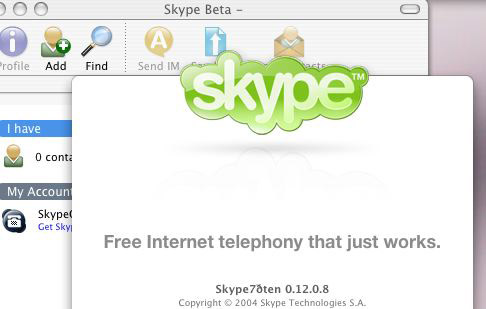
How to Embrace Skype to be a True-Blue, Mobile Entrepreneur!

Skype Mobile

This is a Guest Post from Phil Montero

Creating an effective virtual or mobile office is not as easy as choosing one service or “software” that makes your business mobile.  It requires choosing different services to handle your needs and finding ways to integrate them into your workflow.

Phone, mail, fax, online document storage, sharing large files with co-workers or clients, – All of these are decisions that affect how virtual your business can be. When you find one tool that can address several of these and does them really well – that is a huge plus! Skype is just such a program and I can’t imagine running my anywhere office without it. If you’re a mobile worker, location independent professional, or run a virtual office – Skype should be at the top of your toolbox.

Why does Skype rock? If you think Skype is just an audio or video chat program – you’re wrong.  Skype can handle the bulk of your communication and collaboration needs. I’m constantly amazed at how many ways Skype has improved my workflow and remote collaboration.

To use Skype to it’s fullest you will need a microphone and webcam – but amost any recently purchased laptop (as of the last few years) should already have these built-in. If your system doesn’t have these you can purchase a good USB mic/headset and a webcam for under $200. When you see how much money Skype can save you – that ‘s short money.

Oh Skype how I love thee – lets count the ways..!

Hi-Quality Audio Conferencing

Originally Skype’s key feature and still what it is best known for – it is an excellent VOIP service for hi-quality audio conferecing.  Audio calls are Free if you are using Skype-to-Skype while calls to both traditional landline telephones and mobile phones can be made for a low per minute fee using a debit-based user account system. The call quality of a Skype-to-Skype call is actually superior than a landline or mobile phone. The tone and call quality is much richer.

Because skype-to-skype calls are free you can talk internationally at no cost. Talk about a way to save your business money!  You can also have Skype audio conferences with up to 25 people.  No need for a conference call system (even though there are some good free ones available).  This makes it easy for your communication to escalate naturally from a one-on-one text chat, to a voice call, to a conference call all without leaving your computer or touching the phone.

They also sell very affordable subscriptions for unlimited outgoing calling to phones as well as the ability fo your to get a Skype-In number which gives you a phone number you can use for peope with phones to call you on skype (then you can answer from your computer). You can even get features like call fwding (so your cell phone rings when you are away from your computer to take the call) and voicemail. Many people have started using Skype as their primary business line (I choose Gogle Voice but that is a story for another article).

Instant Messenger

A good instant messenger program is key to virtual work. It can serve as a water cooler, brainstorming platform, and your quick connection to co-workers, colleagues, and clients. IM is a great tool for having an impromptu meeting, sending along a URL, or quickly getting questions answered. You can easily escalate a text chat from one-on-one to a multi-person discussion/forum so it’s easy to have a virtual meeting.

Unlike email everyone sees the messages simultaneously that are typed and can respond so it allows for a more real time flow of conversation.

Also the ability to save entire discussions as text files or copy and paste them into a document to save the conversation can be invaluable.

Share Large Files

There are lots of great services available to let you share large files with others – but the ability to do it through an IM chat makes it seemless.  Need to get that report to a client quickly?  Need to send someone a large video file that would choke their email?  You can easily do it through Skype. According to their site you can send files of any size.

Great One-to-One Video Chat

To me one of the most essential part of Skype is the ability to have one-to-one video chats. Thanks to Skype anyone with a computer and hi-speed internet connection can have desktop video conferencing with quality and features, e.g., full-screen and screen-in-screen modes, similar to those of mid-range videoconferencing systems.

I’ve tried just about every video chat system out there and tested video in all of the various IM systems (Yahoo Messenger, AIM, MSN, etc.) and Skype beats then all hands down. I can’t speak enough about how powerful it is to use video instead of just audio in your communication with remote colleagues. Video adds richness through body language, seeing someones surroundings, and the ability to literally hold something up for the other person to see on camera. It acts as virtual face time and adds so much to the conversation.

Thanks to Twitter I’ve met some amazing people from all over the world and when we take those conversations to the next level we almost always use a Skype video chat.

In fact it’s thanks to Skype video chat that I have become good friends with your fearless VBL Leader – Mr. Chris Ducker.

Shortly after we met on Twitter we started having video Skype chats. We joked about each others hair lines, shared our martial arts statues (he has an awesome Bruce Lee one, that his wife gave him and I have a great Shaolin Monk I got in China Town on a trip to New York). We saw each others families, and offices. In no time we felt like we had known each other for some times despite never having met face-to-face in person –  although we plan to remedy that soon as we share a few beers and a blues jam!

[Note from Chris – Amen to that, brotha!]

Skype recently added a feature I’ve been waiting for  multi-person video chat.  It’s a paid feature and supports up to 6 people. I only tried it once so far but I wasn’t impressed. I was on a 3 person video chat recently – performance was poor and it seemed glitchy. To be completely fair it was only one test and I’ll try it a few more times before passing my final judgment.

Share Your Screen

This amazing feature of Skype is probably it’s least known benefit but another one I use all the time.  With a few clicks you can share your whole screen or a specific window with the other person on the call.  You can screen share a presentation over a call, show friends and family photos without having to send them – even demo an application.

Being a tech guy I get asked a lot of “how-to” questions. I often find myself switching to  screen share during a call to show someone how to do something. So much quicker and easier! If a picture is worth a thousand words – what’s a screen share worth?

Mobile Apps for Smartphones

With apps that run on the 3 main smartphone platforms (Blackberry, Android, and iPhone) all the advantages of skype audio/text chat are mobile! You can actually make FREE calls to other skype users using your cellphone that won’t count toward your mobile minutes or incure extra charges if you’re talking internationally. You can also continue text chats while on the go.

If you have an iPhone – there is a bigger bonus, you also get video! I recently got an iPhone 4 on Verizon and was really excited to test the built in FaceTime application from Apple. It works great but it’s downside is that it only works on WiFi (not 3G) and only allows you to video chat with other FaceTime users.  That leaves me with a rather small pool of friends or colleagues with iPhones or Macs.

Skype for the iPhone recently added video chat and I was amazed when I found it worked on both 3G and WiFi. That means I can now video chat from my phone to any of Skypes over 560 million users. That means if I’m travelling away from my family I can easily video chat with my wife and son to say howdy or good night no matter where I am right from my phone. The Jetsons don’t have nothin’ on me (well except the flying car)!

With a laptop or smartphone all of the communication and collaboration potential Skype offers is completely mobile. Truly amazing! In an era where it takes a lot of different programs to mobilize your work – one tool that can do so much is extreme valuable.

Of all the free and low-cost tools tool I recommend for people to run their businesses online and be more mobile Skype is always near the top of the list.

Phil is about as rock solid as it gets when it comes to technology on the move. Check out his awesome blog, and follow him on Twitter to be ‘in the know’!

How are you utilizing Skype in your business? Any cool stories? And, what other virtual tools are you utilizing to make yourself more mobile..?

Finding Your Niche in 20mins or Less, with 3 Simple Steps!

finding-your-niche

Note: I strongly suggest you check out my Resources Page for information and convenient links to lots of resources that’ll help you build your online niche based business. Check it out!

This is a post a lot of people have asked me to write. So, here goes!

Finding a niche as an aspiring lifestyle designer, digital nomad, web entrepreneur, internet marketer – whatever you want to call yourself – is about as important as remembering to take your skiing equipment on a visit to Switzerland! If you don’t, you won’t get very far.

I’ve been in the ‘real world’ of marketing for 20-years. It’s only over the last 18-months that I have become a huge student of everything internet marketing related, as part of my quest to become a Virtual CEO – leaving me to not only live the life I want to, but continue to grow my brick ‘n mortar business, as well create and launch a huge amount of online business entities as well.

I know what my ‘overall’ niche is. It’s mobile entrepreneurship. However, that’s just the beginning. If I want to create and market successful online products and services, I need to focus on finding a niche, not just once, but over and over again, to be able to create countless business opportunities for myself online.

Lets face it, when you start something new for business (anything!) there is always a lot to take on board. And if you’re like me, you really look at every angle so that when you do launch something it has the absolute best opportunity to succeed. Finding your niche and getting to the point of finding niche market keywords isn’t any different. Trust me.

However, instead of getting bogged down with all the flashing lights of plugins and software you can use and techniques the ‘pros’ promote and make money from, I decide to keep it surprisingly simple. Easy. Quick.

Step #1 – Finding Niche Market Keywords to Work With

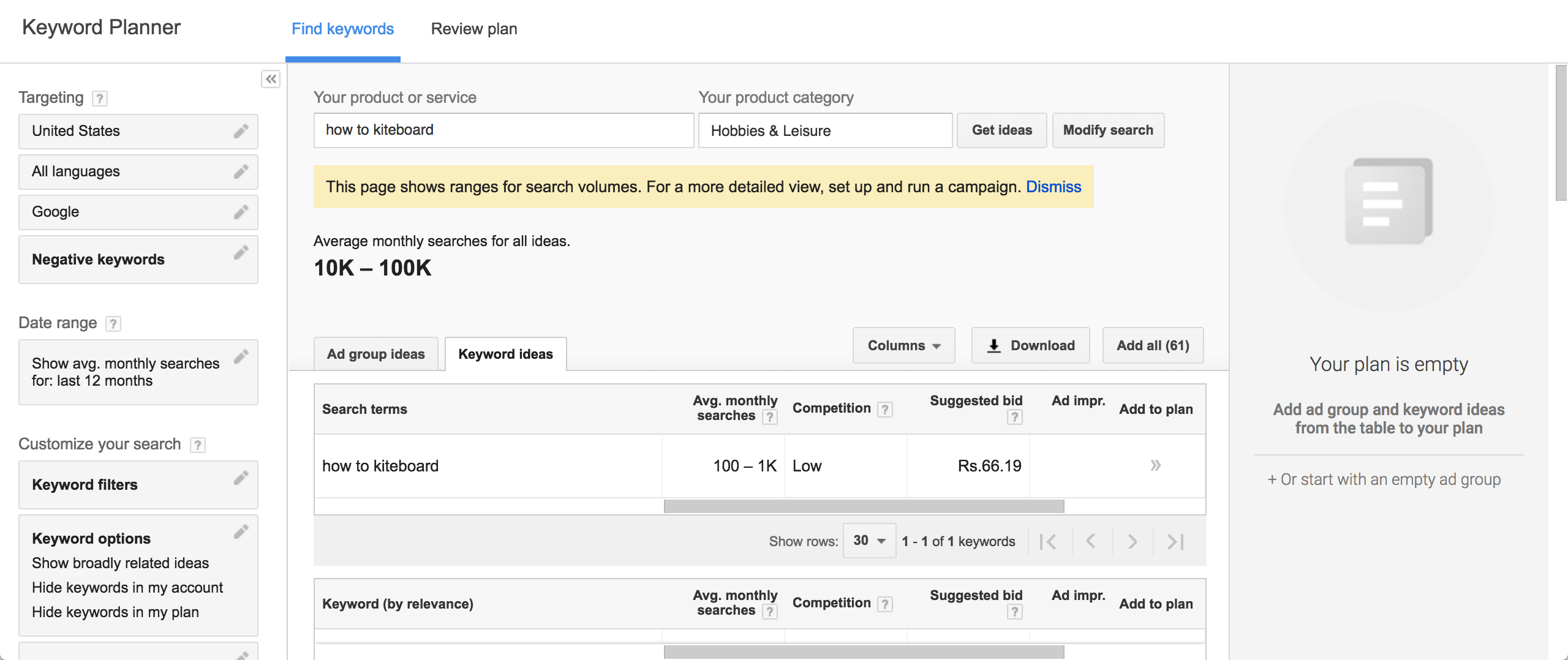
This is the really fun part when it comes to finding your niche! You get to play around here, and search for niche ideas, which is super-easy with Google’s External Keyword Tool. This is a free tool that allows you to find out both local and global search volumes for certain keywords, related keywords, as well as the competitiveness of those keywords, too.

For this example, I’ve chosen the keyword ‘how to kiteboard’.

kiteboard-monthly-searches

It’s invaluable for the entrepreneur wanting to focus on finding a niche to exploit and make money from!

You’re basically going to want to find keywords that pull in an absolute minimum of 1,000 global searches a month (some people chose this number to be affiliated with local searches, however – its a global economy, right!?), but preferably, twice that amount. You’ll also want to be sure that they are not overly competitive, too.

Out chosen example of ‘how to kiteboard’ has a global monthly search volume of 3,600. Perfect!

Step #2 – Checking Out the Competitiveness of Your Keywords

Once you’ve spent some time finding niche market keywords that you want to work with, and subsequently figured out what keyword you’ll focus on, you can then check out how competitive is really is!

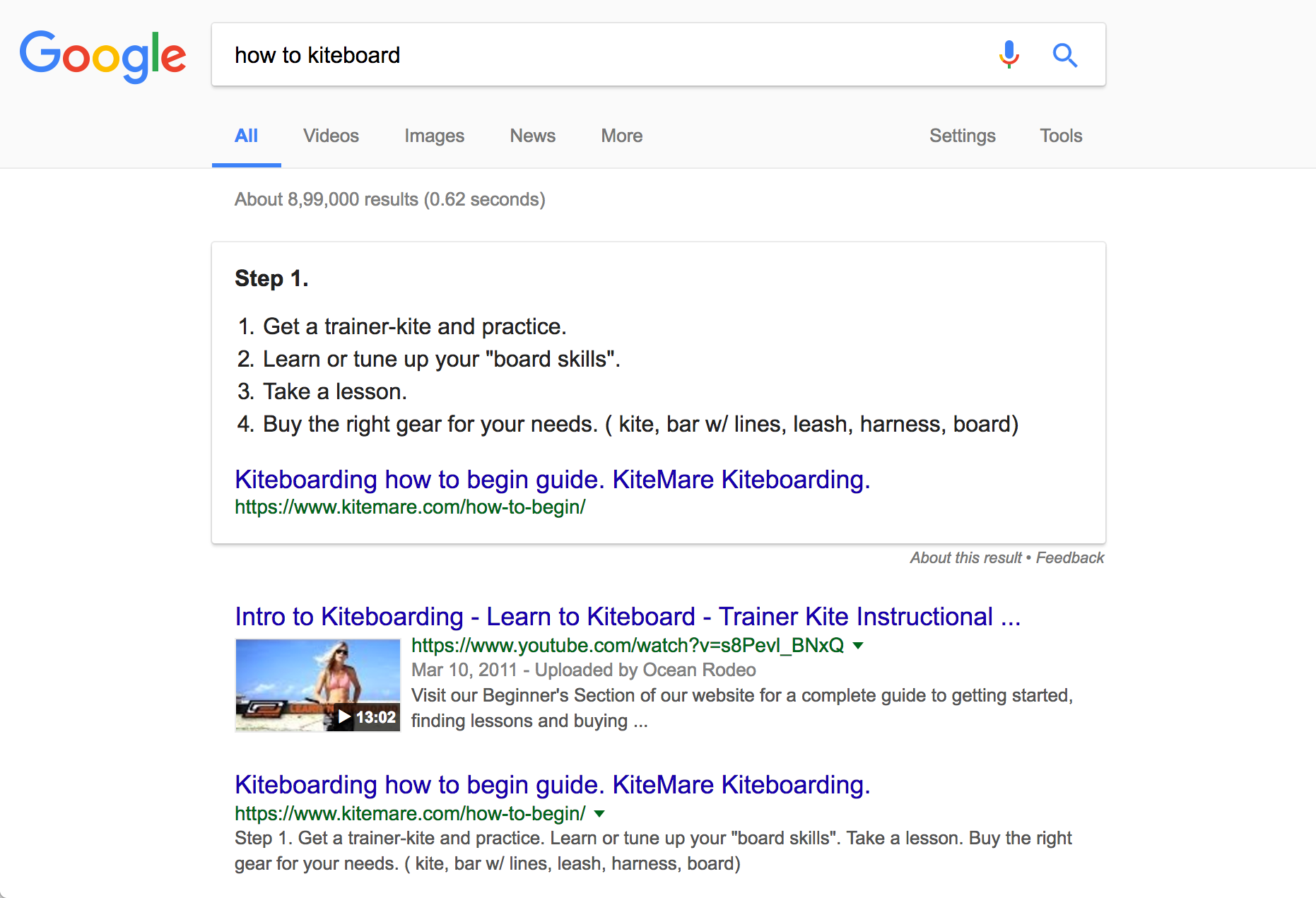
Do this simply by going to Google.com and typing in your chosen niche keyword. You then get to see how many other pages get listed in the results for the keyword, along with any PPC competition, too!

checking-competition

You should also spend a bit of time checking out the video and image search results, too – not for any major reason, but its nice to see what other type of ‘competition’, other than the organic results and PPC customers, is out there when finding your niche in general.

Step #3 – Deciding on ‘No’, or ‘GO!’

Based on the results of the competitiveness test you’ll be able to figure out if you are going to move forward with your niche idea.

Here’s the deal – in our chosen example of ‘how to kiteboard’, there were just over 96,000 websites that popped up in a simple Google search on the keyword. Plus – I hit the refresh button 10-times and the only two PPC ad’s for the same keyword were the only two ad’s that were shown on each attempt. Meaning, there is very little ‘paid for’ competition.

This leads me to believe that because the organic competition is low, and there is very little paid advertising on the keyword, in this case, it would be a ‘GO!’, rather than a ‘No’. If there had of been a boat load of PPC ad’s on the sidebar and at the top of the results page, I probably would not have gone forward with this as a potential niche.

Once you’ve decided its a ‘Go!’, select a domain name that fits your keyword perfectly if possible. Also – try and include a few different keywords all within the same keyword. For example, with our keyword ‘how to kiteboard’, we could select and register any of the following:

  • howtokiteboard.com (includes our primary keyword and ‘kiteboard’)
  • howtostartkiteboarding.com (includes our primary keyword, plus the domain name itself is a keyword, ‘kiteboarding’ and ‘start kiteboarding’)
  • howtogetstartedinkiteboarding.com (includes our primary keyword, and lots more!)

Your Domain, Hosting and Developing Your Niche Site

Registering your domain and hosting your site – Once you’re ready to go ahead and register your domain name, seriously consider doing so through BlueHost (be sure to watch my free step-by-step tutorial to setting up your Bluehost account in less than 10-minutes!), as you get your hosting taken care of at a great price and the domain name is on the house! I personally use these guys for pretty much ALL of my websites and blogs.

blogging-tutorial

One of the really cool features from Bluehost is their one-click WordPress installation. You need know absolutely ZERO coding or programming, it does everything for you!!!

Designing and developing your blog / niche site – When it comes to themes and designing your blog/website, if you want to go big, and get real pro right out of the gate, I suggest you look into the Rainmaker Platform, which is what THIS website is built with. To keep things a little more simple, once you’ve got started with Bluehost, you can visit StudioPress to get your site looking pretty.

Passion Will KILL Competition – Always!

Here’s the deal… If your chosen niche keyword has a certain amount of competition, more than you would usually be happy with, but you are super passionate about the niche you’re thinking of getting involved in, go for it! In my mind passion will always overcome plain old competition. It’s the passion behind Zappos that’s made them the driving force behind shoe sales online – even though there are a ton of people selling shoes online.

So, I hope my simple 3-Step process to finding a niche has got you all excited and about ready to click over to the Google’s External Keyword Tool to start checking out your own ideas. Remember, finding your niche is just the beginning, however.

Once you’ve done it, and the domain is registered, and your theme is installed – then its time to start creating your content, building your links and kick-starting your email marketing list.

Good luck!

Free Ebook

Personal Branding Roadmap

You’re just 10 steps away from your own powerful personal brand business!

DOWNLOAD FOR FREE NOW

Motivational Coach

Motivational

Coach

WORK WITH ME

Book Chris to Speak

BOOK CHRIS TO SPEAK

Visit Youpreneur

The Business of You!

YOUPRENEUR

VISIT YOUPRENEUR.COM

Footer Logo


Chris is a serial entrepreneur and highly regarded as THE authority on the subject of building a profitable personal brand business. 

MUST SEE

  • Round Table
  • Resources
  • Blog

ABOUT CHRIS

  • Chris’ Journey
  • Read Chris’ Books
  • Book Chris to Speak

YOUPRENEUR®

  • Youpreneur Podcast
  • Youpreneur Academy
  • Youpreneur Incubator

LEGAL INFO

  • Terms of Use
  • Privacy Policy
  • Contact

Social Menu

  • © Chris Ducker & 4C Media Limited
  • All Rights Reserved

Privacy Policy

Who are we?

Our website address is: https://chrisducker.com, a site owned and operated by Chris Ducker & 4C Media Limited.

What personal data we collect and why we collect it

Comments – When visitors leave comments on the site we collect the data shown in the comments form, and also the visitor’s IP address and browser user agent string to help spam detection. An anonymized string created from your email address (also called a hash) may be provided to the Gravatar service to see if you are using it. The Gravatar service privacy policy is available here: https://automattic.com/privacy/. After approval of your comment, your profile picture is visible to the public in the context of your comment.

Media – If you upload images to the website, you should avoid uploading images with embedded location data (EXIF GPS) included. Visitors to the website can download and extract any location data from images on the website.

Cookies

If you leave a comment on our site you may opt-in to saving your name, email address and website in cookies. These are for your convenience so that you do not have to fill in your details again when you leave another comment. These cookies will last for one year.

If you visit our login page, we will set a temporary cookie to determine if your browser accepts cookies. This cookie contains no personal data and is discarded when you close your browser.

When you log in, we will also set up several cookies to save your login information and your screen display choices. Login cookies last for two days, and screen options cookies last for a year. If you select “Remember Me”, your login will persist for two weeks. If you log out of your account, the login cookies will be removed.

If you edit or publish an article, an additional cookie will be saved in your browser. This cookie includes no personal data and simply indicates the post ID of the article you just edited. It expires after 1 day.

Embedded content from other websites

Articles on this site may include embedded content (e.g. videos, images, articles, etc.). Embedded content from other websites behaves in the exact same way as if the visitor has visited the other website.

These websites may collect data about you, use cookies, embed additional third-party tracking, and monitor your interaction with that embedded content, including tracking your interaction with the embedded content if you have an account and are logged in to that website.

Analytics

How long we retain your data – If you leave a comment, the comment and its metadata are retained indefinitely. This is so we can recognize and approve any follow-up comments automatically instead of holding them in a moderation queue.

For users that register on our website (if any), we also store the personal information they provide in their user profile. All users can see, edit, or delete their personal information at any time (except they cannot change their username). Website administrators can also see and edit that information.

What rights you have over your data – If you have an account on this site, or have left comments, you can request to receive an exported file of the personal data we hold about you, including any data you have provided to us. You can also request that we erase any personal data we hold about you. This does not include any data we are obliged to keep for administrative, legal, or security purposes.

Where we send your data – Visitor comments may be checked through an automated spam detection service.