
ChrisDucker.com

Helping Entrepreneurs Go The Distance In Business… And Life!

  • About
  • Mastermind
  • Speaking
  • Books
  • Blog
  • Resources
  • Youpreneur
  • About
  • Speaking
  • Coaching
  • Conference
  • Books
  • Blog
  • Tools
  • Contact

Passive Income: 7 Membership Site Tips From A Long-Time Professional Blogger!

This post by David Risley, is part of ‘VBL Guest Post Season 2’.

Membership sites are pretty popular in the internet business arena these days. Passive income, baby!

But, let’s leave the realm of the obvious and move into something practical. Membership sites have been my focus for some time now. I’ve learned some things in the process. The following tips are some which I will pass on to you in the hope of saving you some time.

Shall we get started? 🙂

#1 – Have a front-end offer.

One of the hard truths about membership sites is that they can be hard to sell. It is a larger psychological hurdle to surpass because of the recurring billing. This is one that I’ve run right up against.

The solution is to have some kind of front-end offer. Sell something concrete that they’ll get right away when they enroll. Make it clear that they’ll be enrolled in your membership but that they can cancel any time they want.

#2 – Consider having multiple front-end offers.

When you set up your sales funnel, consider having one core membership site which is recurring. Then, you can have multiple front-end offers out there, targeting various aspects of your niche, all with your membership site being an upsell.

So, you could have, say, 5 different products out there. All of them act as bait in the water. Of course, make each of them extremely valuable for your customer. But, all of them will be lead generators for your membership site in the upsell sequence.

#3 – Have an attractive value proposition.

The days of people signing up for membership sites simply for more content are coming to an end. We are all in information overload. In that situation, people aren’t willing to buy more information – at least in the usual form.

So, you must ask yourself: WHY would people enroll in your membership site? What are you going to do differently in there?

#4 – Think hard about implementing member forums.

The truth is that starting up forums from scratch is incredibly difficult. You really have to build up a momentum before it will work consistently for you. For many, forums become a drag. You have to be in there constantly sparking conversation. Unless you do so, it acts as negative social proof and gives your existing members the sense that they’re alone.

So, don’t have member forums unless you have a plan and know you can get people engaged in there.

#5 – Membership sites don’t have to be recurring.

A membership site makes a great way to distribute products. You can really deliver ANY information product via a membership site. Even an ebook could be downloaded from within a membership site… with some value-added bonuses exclusive to that site.

A membership site can be simple.

#6 – Sometimes lower price makes more money.

The amount of money you make depends on how long members stay enrolled. If you can get them to stick around longer with a lower price, often the math works out so that you’re actually making more money by charging them less.

#7 – Use a drip feed.

You can set up a membership site to work just like an email auto responder. Based on the date your member enrolls, they automatically get content distributed to them on a schedule.

The benefit of this is to make the site more passive for you. Create material once, new members consume it when they’re ready for it. This is much better than they getting everything at once (potentially overwhelming) and also have to constantly create new stuff.

I’ll leave you with this…

Membership sites are an awesome business model. If you have a useful offer for the right market, they’re awesome.

The above tips will hopefully save you some time as you move forward.

To get the plain-spoken truth on how to make money blogging, by visiting David’s blog at DavidRisley.com. To get weekly live video coaching, check out Dave’s InnerCircle, too! It rocks.

Answering the Tribe: A Day in the Life of a Virtual CEO (My Not-So-Usual Daily Routine!)

Day in the Life of a Virtual CEO!The image above I took just yesterday whilst hanging out at the beach with my family. Note: I was not working. In fact, I never work from the beach!

I’ve had a bunch of requests recently from people wanting to know how I get so much done every day / week / month, especially online and in the creation of all my content, additional resources and the running and developing of my businesses. Some VBL Tribe members have even asked what my daily routine is, too.

So, to answer these questions I thought I’d put a few things down in a post and then open the forum to questions and comments, on perhaps anything I’ve not answered, or left out, or anything that people want more info on. Here we go!

My Daily Routine

There is no major ‘secret’ here. I try and get as much of the ‘daily work’ done as possible, in as little time as possible, so I can focus on my other projects and actually working on growing my existing businesses, and building new ones.

The one thing I should mention here is that my daily routine does change quite a bit, its the freedom factor that I have, that I enjoy, and because of that, its always flip-flopping. That’s the way I like it. And, although there is no ‘real’ pattern to my day, my ‘routine’ will normally go something like this:

10am – Breakfast & ‘Urgent’ Email. Because the majority of the business I do is with US-based clients, by the time I wake up in the morning here in the Philippines, its the evening of the day before over there. So, I check ‘urgent’ email whilst enjoying breakfast (usually a bowl of cereal or a protein shake of some variety – in case you wanted to know!), and reply to anything I feel requires an immediate response.

11am – Playtime. I’ll play with my youngest for around an hour or so, or until I pass out!!!

12noon – Task time. I will go through everything I want my VA’s (I have two), and my marketing staff to do throughout the day, sending a few emails and probably a couple of quick Skype calls, too.

1pm – Exercise. I regigiously shoot 30mins of hoops each day and do around 15mins of swimming. Once or twice a week, I’ll also do some light weights. It’s how I keep my sexy body in check (BHAM! Sorry, I just fell off my chair in merriment!) 🙂

2pm – School Time & Lunch. Either myself, or my wife will drop the little one to playgroup, then have lunch.

2pm – Creative Work & Lunch. On the days I am not dropping off the ‘trouble maker’, as I like to call him, I will drive to one of a number of local coffee shops and work for a bit. This time is reserved for my ‘creative stuff’, it’ll be either writing a blog post, putting together podcast ideas, or perhaps focusing on other things such as travel plans , or family stuff.

4pm – Family Time. I do nothing, but play with my kid, hang with my wife, watch TV, go shopping, whatever…

6pm – General Email. This is the time where I will get stuck into clearing out my Inbox. If it takes an hour, great. If it takes two hours (very RARE), then, not-so-great, but still, its achieved.

7pm / 8pm – Staff Meetings / Catch-Up Time. This is where I will meet with my staff, either in the office, or via Skype and go over any projects that we might be working on. If, for whatever reason, this meeting doesn’t take place, I use it for catching up on my favourite blogs, reading a book with a cup of coffee, or generally mooching around online.

9pm – Management Meetings / Consultations. I meet with my COO and other management personnel twice a week to go over operational stuff, as well as any business development work we are putting together. On the days where this meeting doesn’t take place I spend time doing consultation calls with Virtual Staff Finder clients, or with entrepreneurs that have hired me for other consultation services.

10pm and Beyond – Client Calls / Biz Dev Work. Again, the majority of my clients are Stateside, so this time is geared towards speaking with them, when needed. Although my staff do an amazing job of allowing me to be as hands-off as possible, when it comes to the day-to-day operations of my businesses, it doesn’t mean I neglect my clients. If they need me, I am always, ALWAYS available. I also do a certain amount of business development work around this time, too.

Other Times – Putting together podcast episodes, arranging webinars, being interviewed, working on business growth strategies, shooting video posts, handling other local projects, spending time with other members of my team,

It’s NOT The 4-Hour Work Week!

As you can see, I certainly DO work more than 4 hours a week, thats for sure! And, although I rarely ‘work’ on Fridays anymore, I will still check in and spend the time I need to, on my businesses and other business related interests, if and when its needed.

The thing about Tim’s great book was that he was showing you that you didn’t have to do it all; that you could travel more, and enjoy great vacation time; that it was possible to spend more time with family and to be able to make a little money whilst you sleep. He was showing us all of this, plus a lot more.

However, here’s the big thing… How many hours of that daily routine do I class as ‘work’. To be honest… NONE. I’m serious. I love what I do so much that I enjoy every single minute of it. Sometimes the days are a little longer than others. Sometimes I need that additional problem to solve as much as a bullet in the head. And sometimes, just sometimes I wish I really was on a beach with a cocktail in hand (some people actually believe I work from the beach regularly… sorry to burst the bubble, but the internet connection isn’t THAT good when hanging out under a palm tree!). 🙂

I’ve crafted my ideal virtual business lifestyle, and its right for me. This schedule might be totally ‘off’ for you. You might do things completely differently. And that’s what I’d now like to know.

If you’re already working for yourself, whats YOUR daily routine like? If you’d like to break-away from the 9-5 grind, what schedule are you dreaming of? Let us all know below in the comment section.

Top 10 ‘No BS’ Tips to Creating & Launching Your First Virtual Business! (Part 1)

Starting a Virtual Business - Part 1

I’m in the process of editing my first ever VBL-related product, and I have to say, its been a massive learning experience for me.

The fact is that I could have released this thing months ago. But, I have changed things around, procrastinated a certain amount, and quite frankly, put it on the back-burner a lot because of other, more pressing business opportunities and commitments. However, I now have a goal in place to launch this sucker by the time I fly to LA to speak at BlogWorld at the beginning of November.

So, today I’d like follow on from last weeks fantastic discussion on this subject – and present the first part, in a two-part post series with my quick fire tips to getting a virtual business up and running, from scratch, possibly even, for the first time ever…

Lets start…

1. Start a Blog

If you haven’t already got a blog up and running, start one. People like to do business (and spend money) with people. Not businesses, or websites – as far as I’m concerned, anyway. Since starting this blog, my business empire has grown and grown, and even my core business, the Live2Sell Group has expanded – I’ve even had new clients come to me from this blog, who now have 10-15 full-time employees sitting under my company’s roof. Love it!

2. Build Your Brand

Get onto YouTube – now. Again, the personal branding side of doing business virtually, or online, comes into play again. Talking into your webcam is all you need to start off with. Keep your videos short and sweet, provide value, stay on target and include a call to action, such as ‘visit my blog for more free info’, for example.

3. Engage Your Tribe

As the weeks and months go by you’ll start to build a following. FACT – your following online doesnt have to be huge to make good money. I know some marketers online with lists as small as 800-1,000 subscribers who are making $5,000+ each month. Engage your tribe and make them feel welcome. Thank them for commenting on your posts and retweeting your links. Doing things proves you’re real, appreciative and most of all starts conversation – conversation leads to relationships. And relationships are EVERYTHING in business.

4. Ask Your Audience

Before you start putting ideas in place to create a product or service, ask your audience what they need help with. Solving a problem for someone is the oldest sales shooting-star in the book! People will pay good money for things that solve a problem, or make their life easier, or help acheive their dreams… You get where I’m coming from, right? Collating information from the people that follow you will enable you to create a product or service that will knock ’em off their feet and put their hand in their pocket!

5. Start Planning Your Offering

Whether you are anticipating putting together a product (either downloadable, or physical), or a service related offering, start planning sooner, rather than later. The worst case scenario is that you have to change a few things in the future, before launching. I have been planning my upcoming eCourse ‘Virtual Business for Virgins!’ for over a year. I have tweaked its message several times, but the overall ‘guts’ of the product have remained the same – show people how to create and launch a virtual business in 30 days or less!

Having a solid marketing plan in place is also extremely important when planning and launching a new business – whether it be virtual, or not. In the second part of this two-part series, I will go over how you should ‘think in the now’ when producing a solid marketing and launch plan, instead of copying what people were doing years ago – just because it worked for them.

Real time marketing is upon us, ladies and gents. Jump on board, or be left behind. Plain and simple.

Anyone got any comments, insights, feedback and ideas on these first five points? Please jot them down below so we can ALL benefit from them – plus, feel free to include ideas for the second part of this series, too!

UPDATE: Part Two of this series is now LIVE and available HERE! 

.

How to Beat the **** Out of Your Inbox!


Email in Inbox

It’s probably the number one time-drain for entrepreneurs all around the world. Yet, email is about as required today as having a fax machine was in the late 80’s and early 90’s. When it comes to communication, your Inbox is where the party’s at, lets face it…

However, email – and particularly your Inbox, doesn’t have to be the pain in the ass that it is for a lot of busy business owners and 9-5 escapee-wannabe’s! It’s simply about putting systems and processes in place to make sure you don’t get sucked into email doom on a daily basis.

When I was in the process of becoming a Virtual CEO last year, I had a lot of mini-goals that I incorporated into my one-year long goal of escaping my desk on a daily basis. These mini-goals were basically monthly goals and sometimes I’d have to hit several within a one-month period to stay on track.

Rewind to January 2010

In that first month, I set out to remove myself from as many email commitments as possible. The main reason behind this decision was that if I truly wanted to become that Virtual CEO, I had a lot of work and planning ahead of me. I simply wasn’t going to be able to achieve everything I needed to, if I was stuck in front of Outlook all day!

So, I took myself out of as many ‘copy me in’ threads as possible. Everything from my HR team (except management issues), my IT team (except emergencies) and my Operations team (except for a couple of key clients). It worked. I went from spending 4 hours a day on email to around 1-2 hours, depending on the day (Monday is usually a little heavier than most for me).

Moving Email to the Cloud

Nowadays I’m cloud based, and handle all my email via the Gmail platform. This was another move I made last year, around April, which enabled me to become more mobile as a business owner. The ability to check, reply and ‘file’ email from any device I own, or any other computer for that matter, just became golden, and I never see myself going back to a one-device email set-up, such as Outlook, or Mail for the Mac.

But, this doesn’t necessarily mean that I am going to remain super-productive when it comes to battling my Inbox, does it? Of course not. So, I’ve had to put several guidelines and processes in place to make sure that happens.

My 6 Golden Email Rules

Now we get down to the focus of this post. The following guidelines; rules; processes, whatever you want to call them, are not, by any means final, nor irreplaceable, neither are they going to work for everyone out there. However, if you’re a new-age entrepreneur, traveling business owner or small online business boss, believe me – trying them out might just make your life a little easier – and productive.

One Click Rule

This is about as simple as it sounds. When an email lands in my Inbox, I open it and with one click do one of the following:

  • Reply
  • Delete
  • Archive

If you open the email and then go onto another email you’re only going to have to come back to the first one at some point. Why bother yourself? It takes time, it’s irritating and it simply doesn’t make sense to me.

Three Sentence Rule

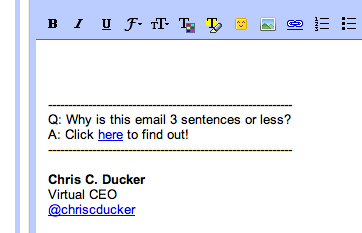
For any of you who might have corresponded with me via email, you would have seen the following email signature when I’ve replied to you (if not, feel free to email me):

The link takes you to a page where you can find out why I answer all of my emails using no more than three sentences. The simple reason behind this is that it enables me to answer my emails properly, yet in a polite and productive manner.

I’m more of a talker than a typer anyway, and so my rule is that if I can’t give a reasonable answer to a question, or a piece of info someone needs within three sentences, then I pick up the phone. The only exception to this rule is business proposals, if need be.

Eliminate Yourself from Email Threads

This will affect some people more than others. But, if you have a lot of people working for/with you within your company set-up, then the chances are that you can probably get your number of daily emails down quite considerably, just like I did, by removing yourself from certain email threads.

Start Using a Project Management System

Using something like Basecamp to work with people on a daily basis, whether they are within your company structure, or not, enables you to cut your Inbox load down even further.

It does mean, obviously, that you’ll be handling messages, updates, etc., from another platform, so you’ll have to balance out things and see whether it will work for you. Bottom line – try it. If it works, great. If not, nothing ventured, nothing gained…

Unsubscribe from Mailing Lists

We are all guilty of this. We see a shiny eBook that we want, or a video course we want to check out. They are free – but, you need to opt-in. This sticks you on someone’s mailing list, however, which means you will get email from him or her regularly (some more than others, obviously).

My rule on this was to remove myself from all of the mailing lists I was on, except for my five favorite bloggers. It was a simple process to undertake. I simply waited for an email to arrive, figured out whether I still wanted to receive messages from the owner of the list, or not, and hit the ‘unsubscribe’ link more often, than not.

Don’t Use Your Inbox as a To-Do List

A lot of people I know make this mistake. And I mean a LOT! This is mad. Think about it – if your Inbox is also your To-Do List, then, as a busy ‘idea a minute’ entrepreneur, you will never clear your Inbox. EVER.

Just the action of leaving the message in there, regardless of what color you flag it, or what nice label you give it, goes against you and your productivity levels. Get your ‘To-Do’ items out of your Inbox and put them somewhere else.

Some ideas of ways to manage your To-Do List could be as follows:

  • A notepad
  • An iPad (as I use now. App – ‘Things‘)
  • An iPhone (or other smart phone)
  • Post-It Notes (I used to use this)
  • Index cards
  • Excel Sheets

Starting Kicking the *** Out of your Inbox, Now!

As you can see, I attack my Inbox in a number of different ways. What matters the most here, more than anything else, is that it works for me. I mean, when you go from 4 hours a day stuck in an email-jam, to an average of an hour or so, that’s killer. That’s game-changing, for ANY entrepreneur.

What are you doing to cut down email and become more productive? Let me know in the comments, below. And… ReTweet’s of this particular post are really appreciated! Thanks.

How to Embrace Skype to be a True-Blue, Mobile Entrepreneur!

Skype Mobile

This is a Guest Post from Phil Montero

Creating an effective virtual or mobile office is not as easy as choosing one service or “software” that makes your business mobile.  It requires choosing different services to handle your needs and finding ways to integrate them into your workflow.

Phone, mail, fax, online document storage, sharing large files with co-workers or clients, – All of these are decisions that affect how virtual your business can be. When you find one tool that can address several of these and does them really well – that is a huge plus! Skype is just such a program and I can’t imagine running my anywhere office without it. If you’re a mobile worker, location independent professional, or run a virtual office – Skype should be at the top of your toolbox.

Why does Skype rock? If you think Skype is just an audio or video chat program – you’re wrong.  Skype can handle the bulk of your communication and collaboration needs. I’m constantly amazed at how many ways Skype has improved my workflow and remote collaboration.

To use Skype to it’s fullest you will need a microphone and webcam – but amost any recently purchased laptop (as of the last few years) should already have these built-in. If your system doesn’t have these you can purchase a good USB mic/headset and a webcam for under $200. When you see how much money Skype can save you – that ‘s short money.

Oh Skype how I love thee – lets count the ways..!

Hi-Quality Audio Conferencing

Originally Skype’s key feature and still what it is best known for – it is an excellent VOIP service for hi-quality audio conferecing.  Audio calls are Free if you are using Skype-to-Skype while calls to both traditional landline telephones and mobile phones can be made for a low per minute fee using a debit-based user account system. The call quality of a Skype-to-Skype call is actually superior than a landline or mobile phone. The tone and call quality is much richer.

Because skype-to-skype calls are free you can talk internationally at no cost. Talk about a way to save your business money!  You can also have Skype audio conferences with up to 25 people.  No need for a conference call system (even though there are some good free ones available).  This makes it easy for your communication to escalate naturally from a one-on-one text chat, to a voice call, to a conference call all without leaving your computer or touching the phone.

They also sell very affordable subscriptions for unlimited outgoing calling to phones as well as the ability fo your to get a Skype-In number which gives you a phone number you can use for peope with phones to call you on skype (then you can answer from your computer). You can even get features like call fwding (so your cell phone rings when you are away from your computer to take the call) and voicemail. Many people have started using Skype as their primary business line (I choose Gogle Voice but that is a story for another article).

Instant Messenger

A good instant messenger program is key to virtual work. It can serve as a water cooler, brainstorming platform, and your quick connection to co-workers, colleagues, and clients. IM is a great tool for having an impromptu meeting, sending along a URL, or quickly getting questions answered. You can easily escalate a text chat from one-on-one to a multi-person discussion/forum so it’s easy to have a virtual meeting.

Unlike email everyone sees the messages simultaneously that are typed and can respond so it allows for a more real time flow of conversation.

Also the ability to save entire discussions as text files or copy and paste them into a document to save the conversation can be invaluable.

Share Large Files

There are lots of great services available to let you share large files with others – but the ability to do it through an IM chat makes it seemless.  Need to get that report to a client quickly?  Need to send someone a large video file that would choke their email?  You can easily do it through Skype. According to their site you can send files of any size.

Great One-to-One Video Chat

To me one of the most essential part of Skype is the ability to have one-to-one video chats. Thanks to Skype anyone with a computer and hi-speed internet connection can have desktop video conferencing with quality and features, e.g., full-screen and screen-in-screen modes, similar to those of mid-range videoconferencing systems.

I’ve tried just about every video chat system out there and tested video in all of the various IM systems (Yahoo Messenger, AIM, MSN, etc.) and Skype beats then all hands down. I can’t speak enough about how powerful it is to use video instead of just audio in your communication with remote colleagues. Video adds richness through body language, seeing someones surroundings, and the ability to literally hold something up for the other person to see on camera. It acts as virtual face time and adds so much to the conversation.

Thanks to Twitter I’ve met some amazing people from all over the world and when we take those conversations to the next level we almost always use a Skype video chat.

In fact it’s thanks to Skype video chat that I have become good friends with your fearless VBL Leader – Mr. Chris Ducker.

Shortly after we met on Twitter we started having video Skype chats. We joked about each others hair lines, shared our martial arts statues (he has an awesome Bruce Lee one, that his wife gave him and I have a great Shaolin Monk I got in China Town on a trip to New York). We saw each others families, and offices. In no time we felt like we had known each other for some times despite never having met face-to-face in person –  although we plan to remedy that soon as we share a few beers and a blues jam!

[Note from Chris – Amen to that, brotha!]

Skype recently added a feature I’ve been waiting for  multi-person video chat.  It’s a paid feature and supports up to 6 people. I only tried it once so far but I wasn’t impressed. I was on a 3 person video chat recently – performance was poor and it seemed glitchy. To be completely fair it was only one test and I’ll try it a few more times before passing my final judgment.

Share Your Screen

This amazing feature of Skype is probably it’s least known benefit but another one I use all the time.  With a few clicks you can share your whole screen or a specific window with the other person on the call.  You can screen share a presentation over a call, show friends and family photos without having to send them – even demo an application.

Being a tech guy I get asked a lot of “how-to” questions. I often find myself switching to  screen share during a call to show someone how to do something. So much quicker and easier! If a picture is worth a thousand words – what’s a screen share worth?

Mobile Apps for Smartphones

With apps that run on the 3 main smartphone platforms (Blackberry, Android, and iPhone) all the advantages of skype audio/text chat are mobile! You can actually make FREE calls to other skype users using your cellphone that won’t count toward your mobile minutes or incure extra charges if you’re talking internationally. You can also continue text chats while on the go.

If you have an iPhone – there is a bigger bonus, you also get video! I recently got an iPhone 4 on Verizon and was really excited to test the built in FaceTime application from Apple. It works great but it’s downside is that it only works on WiFi (not 3G) and only allows you to video chat with other FaceTime users.  That leaves me with a rather small pool of friends or colleagues with iPhones or Macs.

Skype for the iPhone recently added video chat and I was amazed when I found it worked on both 3G and WiFi. That means I can now video chat from my phone to any of Skypes over 560 million users. That means if I’m travelling away from my family I can easily video chat with my wife and son to say howdy or good night no matter where I am right from my phone. The Jetsons don’t have nothin’ on me (well except the flying car)!

With a laptop or smartphone all of the communication and collaboration potential Skype offers is completely mobile. Truly amazing! In an era where it takes a lot of different programs to mobilize your work – one tool that can do so much is extreme valuable.

Of all the free and low-cost tools tool I recommend for people to run their businesses online and be more mobile Skype is always near the top of the list.

Phil is about as rock solid as it gets when it comes to technology on the move. Check out his awesome blog, and follow him on Twitter to be ‘in the know’!

How are you utilizing Skype in your business? Any cool stories? And, what other virtual tools are you utilizing to make yourself more mobile..?

How to Use Super-Mobility to Beat Your Competition!

https://www.youtube.com/watch?v=wJXMvKDBOdw

So, over the last few weeks you’ve seen a few videos featuring myself and Dan Andrews, of TropicalMBA.com fame, talking about the VBL Core4 concepts… Namely, Entrepreneurship, Passive Income, Outsourcing, and now today we tackle the final subject of Super Mobility.

This is something that Dan is crazy about, and I have to say, he leads a much more mobile lifestyle than I do – but, then again, he doesn’t have 250 people working for him, and a family to keep him a little more grounded then I, either! 🙂

What Dan does so brilliantly in regards to the super mobility factor of the Virtual Business Lifestyle is truly… LIVE IT.

Super Mobility

In todays final clip we discuss:

  • The countless excuses of why people don’t escape their businesses.
  • Why ‘super mobility’ is more a mindset than anything else.
  • How I look at travel, and how I make the most out of my overseas trips.
  • Dan’s top 3 tools that he uses to get and stay mobile.
  • Dan’s packing concept for business on the go.
  • Why Dan’s outlook on whats ‘meaningful for his business’, and whats required.
  • Lots more great entrepreneurial chit-chat..!

When we started this video series, I never thought that it would create such a huge amount of positive feedback. To everyone that has commented, hit the ReTweet buttons or Shared / Liked any of the posts on Facebook, thank you. Your support has been greatly appreciated.

I’d love for you to tell us all about YOUR mobility tips, too. Software, devices, strategies – nothing is off limits. Please share your knowledge below in the comment section, help each other and lets close this 4-part series with a BANG!

Entrepreneurial Outsourcing – Tips from the Trenches!

https://www.youtube.com/watch?v=UTznTW_wwJc

Over the last couple of Monday’s, myself and Dan Andrews have been talking about different aspects of the Virtual Business Lifestyle concepts, or the VBL CORE4 as I call them. In week 1 we covered Virtual Entrepreneurship, last week it was Passive Income and so, here we are for the third Monday in a row (and you’re still coming back – amazing!!! LOL) to talk about a subject that we are both super passionate about – Outsourcing, specifically entrepreneurial outsourcing.

As some of you will no doubt already know, I am the owner of an outsourcing services provider company, based in the Philippines, with almost 250 people working for me (and their respective clients worldwide) full-time. I’ve been in the business close to ten years and I’ve trained thousands and thousands of virtual workers. I love this industry and everything regarding working with virtual staff.

Dan attests the use of entrepreneurial outsourcing, and working with virtual assistants in his business to the ultimate growth of his company and everything else that happens to him as an entrepreneur. In this video, amongst other things we discuss:

  • The importance of working with VAs to grow your business.
  • How to train VAs to maximize their productivity.
  • Brainstorming on new business ideas together.
  • My Virtual Staff Finder service and some of the top internet marketers and pro-bloggers that have used the service to find their virtual assistants.
  • How I removed myself from the service and WHY I thought it as important to do so.
  • Why entrepreneurial outsourcing should not be overlooked, regardless of company size.
  • Lots more stuff!

Outsourcing to many people that visit the VBL Blog is not a new subject. Whether you heard about it through the pages of the 4-Hour Work Week, or on this blog (or anywhere else for that matter!), the most important thing is that you know about it, and what it can do for you as a business owner.

If you have absolutely any questions at all on the subject of entrepreneurial outsourcing, please jot them down in the comments section below. I’m more than happy to help. Next Monday will see the final part of this video series, where we’ll be talking about Super Mobility!

5 Steps Toward Making Your Goals Inevitable!

Your Future

This is Guest Post by Jacob Sokol.

“If you can tell me who your heroes are, I can tell you how you’re going to turn out in life.” -Warren Buffet

I’ve been interested in what my future will look like for a mighty long time. From fulfilling relationships to personal finances, the spectrums of potential circumstances that interest me are most definitely diversified. I want to be healthy, happy, handsomely wealthy and having fun while contributing to the world in a massively meaningful way. I knew that actualizing those intentions were possible, but i didn’t always have a clear blueprint for bringing me closer to those goals.

To be crystal clear, let me just put this out there: I’m not a psychic, not a gypsy, not a healer, not a channeler, not a medium, not a fortune-teller, not a spirit-speaker, not a witch-crafter, and i am definitely not a devil-worshiper. I do however believe in the power to predict our future, and even positively influence it as well.

Let me ask you this: How could you make it so an outcome that you want to achieve is inevitable?

Enter “Inevitability Thinking.” Inevitability Thinking is all about conditions and setting up the right set of circumstances so that what you want to happen will “automatically” do so.

Don’t Buy Ice Cream!

Here’s an example. If you wanted to stop eating Ben & Jerry’s Chunky Monkey ice cream at night, one way to make that inevitable is not to buy it when you go grocery shopping. We’re going to use Inevitability Thinking to create the right set of influences in your life – ones that will bring you closer to who you want to become and where you want to go.

Before we go any further into the future though, let’s play a bit in the present moment. I want you to take this time to identify some information about yourself. First we need to look at who the five people that you spend the most time with are. That could include, but isn’t limited to:

  • Colleagues
  • Lovers
  • Friends
  • Family
  • Roommates
  • Hobbyists
  • Social-networkers
  • Etc…

Take the time to write down who those five people are. Really do it – you’re already reading this article, you might as well get the benefit from it. Now ask yourself some questions about those five people and answer honestly:

  • How motivated are they?
  • How healthy are they?
  • How much money do they make?
  • What are their habits?
  • How happy are they?
  • How productive are they?
  • What are their goals?
  • What are their relationships like?
  • What are their eating habits like?
  • Are they optimistic?

Think about the answers to those questions. Here comes the shocker…

If i didn’t know anything about you, except for whom the five people that you spent the most time with were, and what the characteristics of those five people are, I would have a pretty good idea of who YOU are – even if I’ve never met you!

Jim Rohn may have simply said it best here: “You are an average of the 5 people that you spend the most time with”. Wild stuff but the freak-show hasn’t completely closed yet. Check this out…

If I was to analyze that data, i could pretty accurately predict where you’ll be in the future based on these answers in the now. Wow! Let’s take a look at how we can put this knowledge into optimal action and create a set of circumstances conducive to making what you want inevitable.

5 Steps Toward Making Your Goals Inevitable

1. Ask yourself. “What does my ideal life look like?” It may help to think in terms of these categories:

  • Physical
  • Mental
  • Emotional
  • Spiritual
  • Social
  • Financial
  • Creative

Once done, I suggest that you write down your answers and put them up somewhere that you’ll see daily (but not just yet.)

Helpful hint: I suggest dreaming BIG. Far-out! Unrealistic. Whatever … Pretend that it was impossible for you to fail. Then articulate those answers. Doing this plants a seed in your mind that has the potential to sprout through small steps and time.

2. Score Yourself. Now take out the list that you wrote down earlier identifying the five people that you currently spend the most time with. See if the people on your list have the same qualities that your ideal life has.

In other words: are the five people that you spend the most time with bringing you closer to your ideal life, or are they pulling you further away? Identify if they’re averaging you up, or dragging you down.

3. Survey Your Environment. Think thoroughly and make a list of five people that you currently know that will bring you closer to living the life you want. These are people who have the qualities that it takes to get where you want to go. You can look through your:

  • Contacts
  • Emails
  • Job
  • Gym
  • Mind
  • And every other possible place to identify these people.

Helpful hint: If you don’t have five extraordinary people in your life to list, start by writing down what the characteristics of those people would be. Be on the lookout for when the opportunity to connect with people of such caliber presents itself, and then, take action!

4. Set The Example. It’s time to adjust accordingly. I know this is a sensitive subject and we don’t want to just go throwing out our closest friends. A good friendship is a sacred and honored bond to be cherished (and made fun of too.) With that in mind, we can still choose to scale back the amount of time that we spend with people who are not in alignment with where we want our lives to be.

Do what you have to do to become the person that you know you can be. Be virtuous and act with wisdom, courage, truth, justice, temperance and love! Then when it does come time to hang out with old friends and family, you are the living exemplification of the change that you want to see.

5. Be The Answer. Ask yourself this quality question: who do I need to become to attract the type of people into my life that will average me up? Answer that question honestly. Then take baby steps towards becoming that person. If you do, before you know it, not only will those people be in your life, but you’ll be averaging yourself up also.

This sequence of steps was an example of adjusting who you spend your time with based on Inevitability Thinking. Equally as important as whom you’re spending your time with is what you’re spending your time doing. All of your activities either average you up toward being the type of person that achieves your goals, or they can take you further away from them as well.

Personally, if i wanted to average myself down, I would do this:

  • Watch TV, especially the news.
  • Listen to the radio, especially public.
  • More Facebook, with lesser quality friends.
  • Gossip and talk about other people’s business in my conversations.
  • Hang out with people who have no interest in living an optimal life.

Currently, to “average myself up,” I do this:

  • Listen to interviews with people that inspire me.
  • Read books on subjects that I’m passionate about.
  • Meditate and spend some time with the universe daily.
  • Watch funny movies and documentaries on interesting ideas.
  • Make sure the people who I’m communicating with online are awesome.
  • Purposely pick what music i listen to depending on what mood i want to be in.

I also invite you to play with the idea of watching how you spend your time.

Ask Yourself This…

Ask yourself if what you’re doing, and who you’re doing it with, is bringing you closer to or further from the person that you know you can be. If it’s bringing you closer, that’s amazing. If it’s not, what are the circumstances that you need to put in place to make it inevitable that what you want to happen will?

Read more from Jacob about creating An Extraordinary Life at his blog, Sensophy.com. You can also follow him on Twitter.

Understanding Passive Income – According to Two Virtual Entrepreneurs!

https://www.youtube.com/watch?v=qeV4jp63IRo

Following on from last week’s video with Dan Andrews from TropicalMBA.com, where we discussed Virtual Entrepreneurship, this week we attack the time-honored subject of Passive Income.

What follows is another light-hearted collection of random ramblings on the subject, peppered with a few golden nuggets of information, and a massive amount of props to my buddy Pat Flynn from SmartPassiveIncome.com (including a special appearance from Pat, too!).

I’ve discussed the subject of making money online a lot on this blog, particularly on the VBL Podcast with guests such as John Chow, Pat Flynn, Chris Garrett and Glen Allsopp to name just a few. Why? Because passive income is a massively popular subject, and shows no sign of slowing down anytime soon.

We discuss many points in this video, and break down what it means to incorporate passive income into your life as a virtual entrepreneur in general. You’ll find that this conversation was a little more serious than the first one – however, we did still have a few more out-takes for you at the end, just like last time.

If you have any specific questions on the subject of passive income that you’d liked answered, just drop them below, and likewise – if there are things that are working for you online, when it comes to your income that you’d like to share, feel free below, too.

Reality Check: Are You Achieving Your Goals…?!!

Reality Check

Every month I set myself a goal. Sometimes its ‘bigger’ than others…

Sign a new client with a minimum 10-employee requirement, create a new policy to promote and encourage more reading in the workplace, gain another 200 RSS subscribers, listen to more inspiring podcasts, spend more time developing business ideas, take the family to a resort for 3-days of relaxation… you get it.

I’ve said it before many, many times. Goals are the cornerstone of entrepreneurial success. If you are spending time on any project, any idea, any business model, without putting goals in place first – then, you are literally walking through the jungle at night without a flashlight. You’re going to get nowhere!

Are You Being Realistic ..?

Here’s the thing… No matter what goal I set for myself, I always, ALWAYS make sure of two very simple things. They are as follows:

  • ONE: That it’s achievable. Setting a goal that is so outlandish that I’ll never hit it, is simply pointless. As well as being extremely time consuming.
  • TWO: I achieve it.

Sometimes I feel the benefits of hitting my goals immediately. Sometimes its something that will ‘hit home’ later on. But, I always make sure that I hit my goals. It’s what keeps me going as a business owner, husband and father.

How Are You Doing…?

What goals did you set in place for yourself this month? We’re now half way through the current month. Have you looked at where you are with that goal? Anything more you can do RIGHT NOW to be sure you hit the goal by the end, or before the end of the month..?

Let us all know below in the comments section how you’ve been doing. Give details – the juicer, the better! What was your goal this month – and how you’re doing with it..!

  • PREVIOUS
  • 1
  • …
  • 3
  • 4
  • 5
  • 6
  • NEXT

Free Ebook

Personal Branding Roadmap

You’re just 10 steps away from your own powerful personal brand business!

DOWNLOAD FOR FREE NOW

Motivational Coach

Motivational

Coach

WORK WITH ME

Book Chris to Speak

BOOK CHRIS TO SPEAK

Visit Youpreneur

The Business of You!

YOUPRENEUR

VISIT YOUPRENEUR.COM

Footer Logo


Chris is a serial entrepreneur and highly regarded as THE authority on the subject of building a profitable personal brand business. 

MUST SEE

  • Round Table
  • Resources
  • Blog

ABOUT CHRIS

  • Chris’ Journey
  • Read Chris’ Books
  • Book Chris to Speak

YOUPRENEUR®

  • Youpreneur Podcast
  • Youpreneur Academy
  • Youpreneur Incubator

LEGAL INFO

  • Terms of Use
  • Privacy Policy
  • Contact

Social Menu

  • © Chris Ducker & 4C Media Limited
  • All Rights Reserved

Privacy Policy

Who are we?

Our website address is: https://chrisducker.com, a site owned and operated by Chris Ducker & 4C Media Limited.

What personal data we collect and why we collect it

Comments – When visitors leave comments on the site we collect the data shown in the comments form, and also the visitor’s IP address and browser user agent string to help spam detection. An anonymized string created from your email address (also called a hash) may be provided to the Gravatar service to see if you are using it. The Gravatar service privacy policy is available here: https://automattic.com/privacy/. After approval of your comment, your profile picture is visible to the public in the context of your comment.

Media – If you upload images to the website, you should avoid uploading images with embedded location data (EXIF GPS) included. Visitors to the website can download and extract any location data from images on the website.

Cookies

If you leave a comment on our site you may opt-in to saving your name, email address and website in cookies. These are for your convenience so that you do not have to fill in your details again when you leave another comment. These cookies will last for one year.

If you visit our login page, we will set a temporary cookie to determine if your browser accepts cookies. This cookie contains no personal data and is discarded when you close your browser.

When you log in, we will also set up several cookies to save your login information and your screen display choices. Login cookies last for two days, and screen options cookies last for a year. If you select “Remember Me”, your login will persist for two weeks. If you log out of your account, the login cookies will be removed.

If you edit or publish an article, an additional cookie will be saved in your browser. This cookie includes no personal data and simply indicates the post ID of the article you just edited. It expires after 1 day.

Embedded content from other websites

Articles on this site may include embedded content (e.g. videos, images, articles, etc.). Embedded content from other websites behaves in the exact same way as if the visitor has visited the other website.

These websites may collect data about you, use cookies, embed additional third-party tracking, and monitor your interaction with that embedded content, including tracking your interaction with the embedded content if you have an account and are logged in to that website.

Analytics

How long we retain your data – If you leave a comment, the comment and its metadata are retained indefinitely. This is so we can recognize and approve any follow-up comments automatically instead of holding them in a moderation queue.

For users that register on our website (if any), we also store the personal information they provide in their user profile. All users can see, edit, or delete their personal information at any time (except they cannot change their username). Website administrators can also see and edit that information.

What rights you have over your data – If you have an account on this site, or have left comments, you can request to receive an exported file of the personal data we hold about you, including any data you have provided to us. You can also request that we erase any personal data we hold about you. This does not include any data we are obliged to keep for administrative, legal, or security purposes.

Where we send your data – Visitor comments may be checked through an automated spam detection service.